Correct answer: the knowledge challenge with smart marking and hints
Correct answer turns the bingo card into a gamified quiz. Test knowledge of the company, the event's theme, the sponsors or the products, with marking that forgives small mistakes and hints for anyone who gets stuck.
Where correct answer works best
Company events & kickoff
Put the spotlight on the goals, the company's history, the values, or fun trivia about the management.
Expo & client event
Lead visitors to booths and stations where the answer to a tricky product question can be found.
Training & conference
Repeat and reinforce the key messages from the stage in a playful way.
Step by step
Opens the square
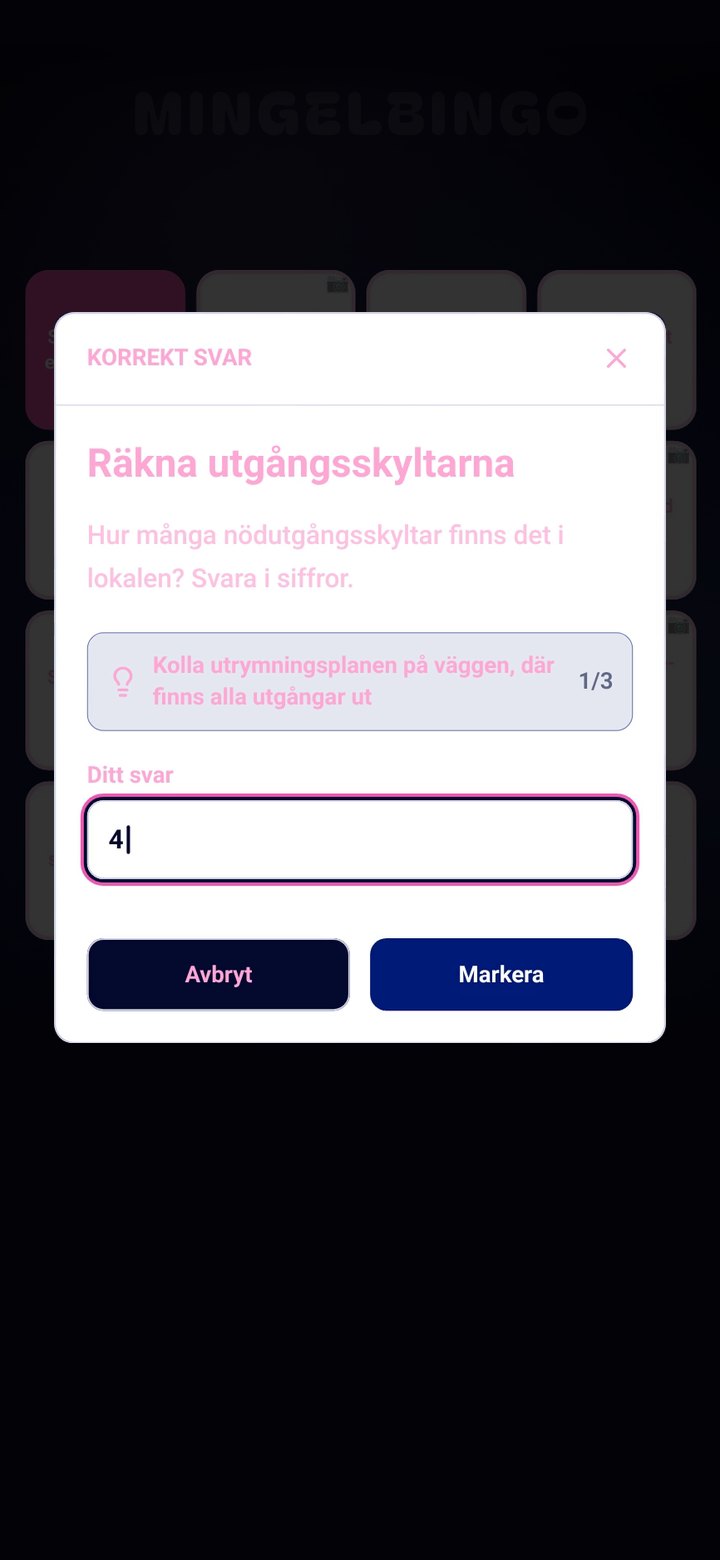
The card shows the question, an optional description and an optional image, for example a product, a map or a photo of a colleague.
Sees the hint box
If the question has hints, a locked box appears right below the text. After two wrong guesses the first hint unlocks, and then a new one for each wrong answer, up to three that lead towards the right answer.
Types the answer
The player types their answer and presses Enter or Mark.
Right answer
The square is approved straight away, the card closes and the square fills with the event's colour on the card.
Wrong answer
The field shakes and “Wrong answer, try again.” is shown. The field is ready straight away for a new attempt, and from the second wrong answer hints appear, up to three.
Smart marking, so nobody is knocked out by a spelling detail
Upper and lower case don't matter
Stockholm, stockholm and STOCKHOLM are all correct. Extra spaces and trailing full stops, commas, question marks and exclamation marks are removed.
Approximate answers and units
If the player writes “approx 50”, “about 50”, “around 50” or “~50”, it counts as 50. Words such as pcs, people, years, SEK, %, km and minutes are removed automatically.
Numbers the way people write them
If the answer is 1500, then 1500, 1 500, 1,500 and “approx 1500 pcs” are all accepted.
Forgiving of typos
In words of 4–7 letters one typo is accepted, in longer words two. Numbers and years, however, must be exact, so a wrong year is never accepted.
Several accepted answers
Add synonyms and abbreviations, for example Gothenburg, Göteborg and Gbg, or CEO, chief executive and MD. A question can also have several correct answers, for example several names, words or cities, and then any of them is accepted.
Progressive hints: help at the right pace
Up to three hints per question, unlocked automatically the more times the player answers wrong. Nobody gives up, and nobody gets the answer handed to them.
The hint box is locked and shows “Hint unlocks after 2 wrong answers”.
Hint 1 unlocks and is highlighted in the accent colour.
Hint 2 unlocks, and the player can flip between the hints.
Hint 3 unlocks. Longer hints expand without moving the answer field, and they stay if the player closes the square and comes back.
Hints that lead to the right person
Safe even when the connection wobbles
If the connection wobbles, the answer is still saved as soon as the phone reconnects, and nobody gets it wrong because of a poor connection.
Example questions
Statistics and Wrapped
All answers are saved, so you can evaluate what participants knew and what needs saying again.
Difficulty
See which questions took the most attempts and which were solved on the first try. Under Participants you can also see each player's guesses: how many times they guessed and what they wrote.
Answer rate
See exactly how many participants cracked each question.
Statistics for exhibitors
At trade shows every exhibitor sees in their Exhibitor Wrapped after the show how many visitors solved their booth question.
Wrapped
The participant's personal Wrapped 24 hours after the event highlights their achievements, for example how many correct answer questions they completed.
How to set it up in admin
Choose the question type when you create or edit a question, in the event or in the template library.
Write a clear question, for example “What year was the company founded?”, and an optional explanation.
Type in the main answer and add synonyms or abbreviations that should also be accepted. If there are several correct answers, for example “Name a partner of the event”, add them all.
Optional: an image, a logo or a clue photo.
Optional: up to three hints that help step by step with tricky questions. They unlock after the second wrong guess.
Optional at trade shows: link the question to a booth, so the answer becomes an activity there, and the exhibitor gets the result in their Exhibitor Wrapped after the show.
Let AI suggest clear descriptions and hints for the question with one click.
Trade shows, product stations, kickoffs, training and quiz moments where you want to reinforce knowledge or lead people to the right place.
Keep the answers short (one word, a year or a number) and ideally put them on a sign, at a booth or by the stage. Then the question creates movement too.
Mix the question types
A really good card, usually 16 or 25 squares, mixes the types. This is what the mix usually looks like:
The questions that usually come up
What happens if the player misspells slightly?
One typo is accepted in words of 4–7 letters and two in longer words. Upper and lower case, extra spaces and punctuation don't matter.
Are “approx 50” or “1,500 pcs” accepted?
Yes. The game understands small differences in how the answer is written, for example “1,000”, “1000” or “1000 SEK”. Numbers and years, however, must be right.
How do the hints work?
Up to three hints per question unlock automatically: the first after two wrong answers, then another after each new wrong answer.
What happens if the connection drops when someone answers?
The answer is saved as soon as the phone reconnects, and nobody gets it wrong because of a poor connection.
Can exhibitors see how their question went?
Yes. At trade shows every exhibitor sees in their Exhibitor Wrapped after the show how many visitors solved their booth question.

Digital mingle bingo: the game that gets people to meet, move around and discover more.