Letter tiles: the word puzzle where the player taps out the answer
An interactive mini puzzle where the participant puts together the right word with tappable letter tiles. It combines the challenge of a riddle with the feel of a modern mobile game.
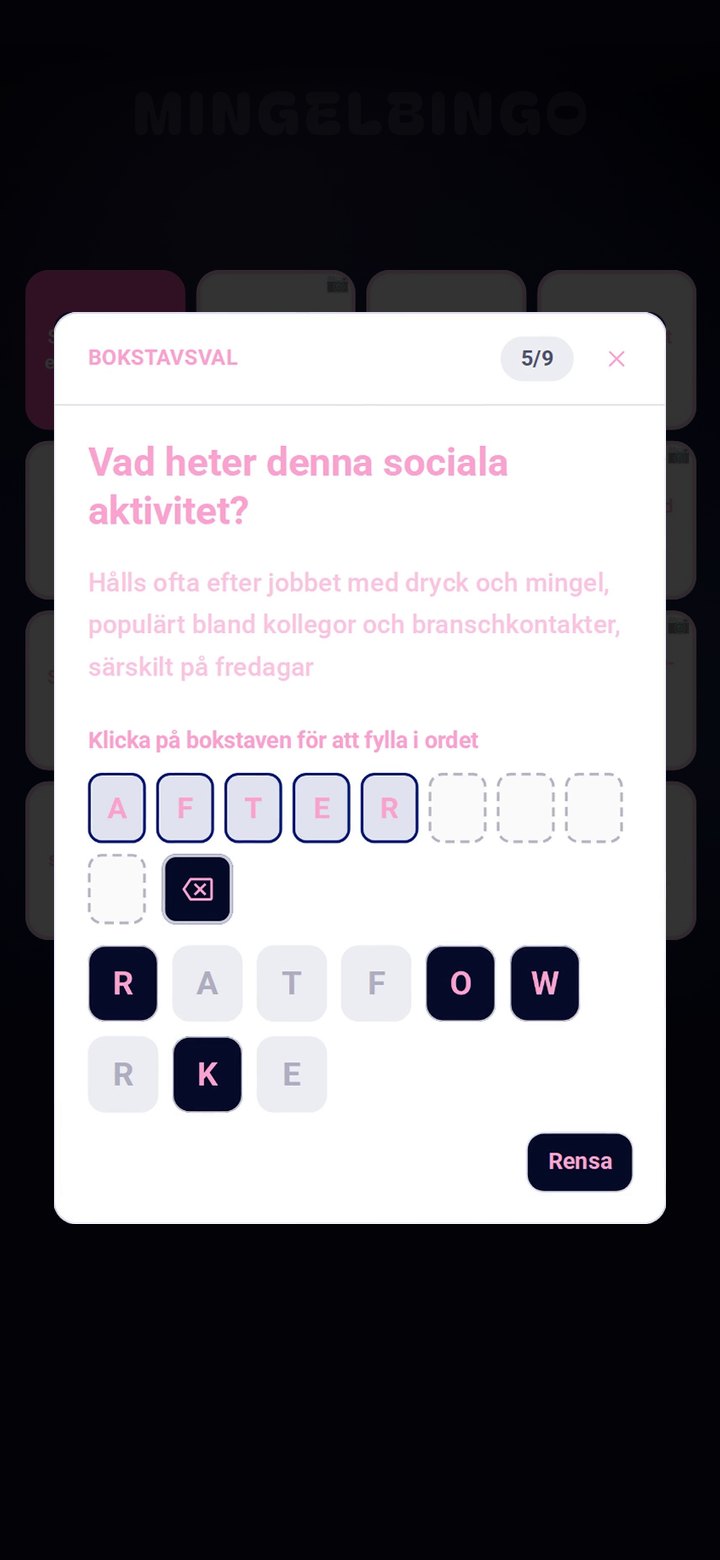
Step by step
Opens the square
The player sees the question, an optional image and a row of empty letter boxes showing exactly how many letters the word has. Spaces in answers with several words are added automatically.
The letters to choose from
Below the boxes are all the letters of the answer as tappable tiles in random order. A discreet counter in the corner, for example 2/5, shows how many letters have been placed.
Chooses and undoes
A chosen letter jumps up into the next free box and turns grey among the letters below. If the player changes their mind, they can remove the last letter with the back arrow, tap a placed letter to remove just that one, or tap Clear to start over.
Marked automatically
No Send or Mark button: as soon as the last letter is placed, the word is checked. Right: the square is marked on the card straight away. Wrong: the boxes shake, “Wrong answer, try again.” is shown and the boxes are emptied for a new attempt.
Hints when needed
If the organiser has added hints, they unlock automatically after wrong attempts, for example the first after two wrong. The player taps to reveal the hint when they want help.
What makes letter tiles smart in MingelBingo
No typos or keyboard hassle
The participant just taps ready-made tiles: no phone keyboard covering the screen and no autocorrect messing things up.
Progressive hints
If the participant gets stuck, hints unlock after a certain number of wrong attempts.
Smooth editing
Undo a single letter, remove the last one with the back arrow or tap Clear to start over.
Counter and multi-word answers
The counter shows how many letters have been placed, and spaces in answers with several words are handled automatically.
Example questions
How to set it up in admin
When you create or edit a question, choose Letter tiles.
Type in the correct word or phrase. The system takes care of the rest: the boxes are created and the letters are shuffled automatically for the players.
Optional: 1–3 hints that help step by step if someone gets stuck.
Trade shows, stations with keywords, riddles, product names and whenever you want a fast pace without long text entry.
Choose answers of 4–9 letters. That gives the best balance between a challenge and a quick moment in the game.
Mix the question types
A really good card, usually 16 or 25 squares, mixes the types. This is what the mix usually looks like:
The questions that usually come up
How do letter tiles work for the player?
The letters of the answer are in random order on tappable tiles. The player taps out the word and the square is marked automatically when the last letter is placed.
What happens after a wrong answer?
The boxes shake, “Wrong answer, try again.” is shown and the boxes are emptied. If the organiser has added hints, they unlock automatically, for example the first after two wrong.
How does the organiser set up a letter tiles question?
Choose the question type Letter tiles, type in the right word or phrase and optionally add 1–3 hints. The boxes and the shuffled letters are created automatically.
Do answers with several words work?
Yes. Spaces in the answer are added automatically as gaps between the words.
How long should the answers be?
Between 4 and 9 letters gives the best balance between challenge and pace.

Digital mingle bingo: the game that gets people to meet, move around and discover more.