Name question: the mingle that gets people talking and remembering each other's names
MingelBingo's original heart. The name question gives participants a fun, no-pressure reason to walk up to new faces, ask an unexpected question and remember the person's name, long after the event.
Built for mingling and for remembering names
A reason to walk up
The square gives participants a genuine reason to start a conversation with colleagues or guests they've never talked to before.
A real person in the room
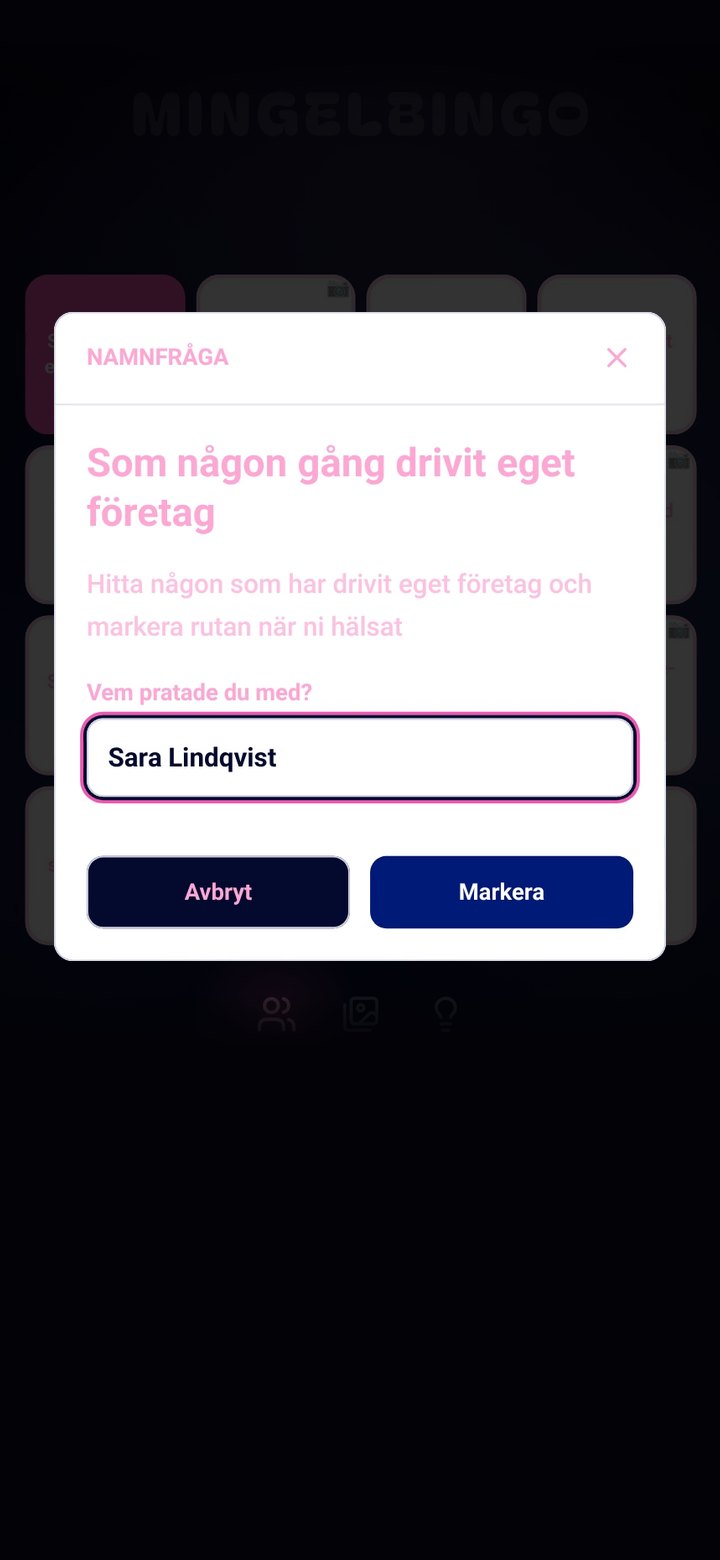
The task is to find someone who fits the statement, find out their name and type it in: a real meeting, not a quiz.
A name to remember
The name appears in the square and is saved in the participant's contact list in the game, Your new connections. There the player sees every name they've entered, and they come back in Wrapped 24 hours after the event.
Step by step
Opens the square
The card opens smoothly in the middle of the screen.
Reads the task
For example “Find someone who has lived abroad”, with an optional description and image.
Mingles
The player walks around the room asking people until they find someone who fits.
Types the name
The person's name is typed into the field Name of the person.
Marks it
The player taps Mark, or Send on the phone keyboard.
The name appears on the card
The square is approved straight away and shows the person's name.
Built for remembering who you met
The name appears in the square
Every completed square shows the person's name, and in the contact list Your new connections the player sees everyone they've talked to.
Change it whenever you like
If the player typed the wrong name, they tap the square again and choose Unmark.
Nothing disappears
The names are saved straight away. If the player reloads the page, everything is still there.
The built-in networking book
In Mingle mode every participant gets their own contact list. It's the reason the names stay with them after the event.
Saved automatically
Every name typed into a name question goes straight into the player's list.
With context
The list shows the name, what you talked about (for example “Has run a marathon, Gustav”) and when you talked.
The names are still there afterwards
The day after, participants actually remember who they met, and know who to get in touch with.
Example questions
Wrapped and statistics
The name questions give great material for follow-up, both for the participants and for you.
Wrapped for the participant
The personal summary 24 hours after the event shows how many new contacts the participant made, and awards such as “The networker” and “Social butterfly”.
Statistics in real time
Follow how many names have been registered in total, and which questions were easiest and hardest to find people for.
A list of all answers
A complete list for evaluation or for drawing winners.
How to set it up in admin
Choose the question type when you create a question in the event or in a template.
Max 50 characters: short, punchy and easy to read on the card, for example “Has worked here for over 10 years”.
Optional: an extra instruction shown when the square is opened.
Optional: an image shown on the card.
Write the question in both languages, or let AI translate automatically.
With the AI question generator you choose how deep the name questions should be: light and quick, balanced or personal and deep.
Mingles, after works, kickoffs, networking events, conferences and trade shows, anywhere participants should get to know new people and remember them afterwards.
Give the statements a personal or unexpected twist and keep them short. Then it's fun and pressure-free to ask the question straight out in the mingle.
Mix the question types
A really good card, usually 16 or 25 squares, mixes the types. This is what the mix usually looks like:
The questions that usually come up
What is a name question in MingelBingo?
A square of the type “Find someone who …”. The player mingles until they find a person who matches, types in the name and marks the square.
How do participants remember who they talked to?
The name appears in the square on the card and is saved in a contact list in the game, Your new connections, which the player can reach at any time during the game. The names also come back in Wrapped 24 hours after the event.
Can the same person fill several squares?
Yes, the same name can be typed in several squares. If you want as many meetings as possible, ask participants to find a new person for each square when you explain the rules.
Can you change a name afterwards?
Yes. The player taps the marked square, chooses Unmark and can then type in the right name.
Do name questions work in English?
Yes. The questions can have parallel texts in Swedish and English, and AI can translate automatically.

Digital mingle bingo: the game that gets people to meet, move around and discover more.