Open question: the event's collector of ideas and opinions
Where the name question connects people and correct answer tests knowledge, the open question collects participants' thoughts, experiences, ideas and feedback. No answer key and no wrong answers, just their own words.
Where the open question works best
Kickoff & company events
Capture staff's ideas about the future, what they're most proud of and what they want to develop over the year.
Conference & all-hands meeting
Collect spontaneous feedback, reflections on the morning's presentations or questions for the panel discussion.
Expo & client event
A digital suggestion box or quick survey, for example “What is your biggest challenge in logistics right now?”.
Team building & after work
Fun personal questions that become conversation topics at the tables, such as “The best film you've seen this year”.
Step by step
Opens the square
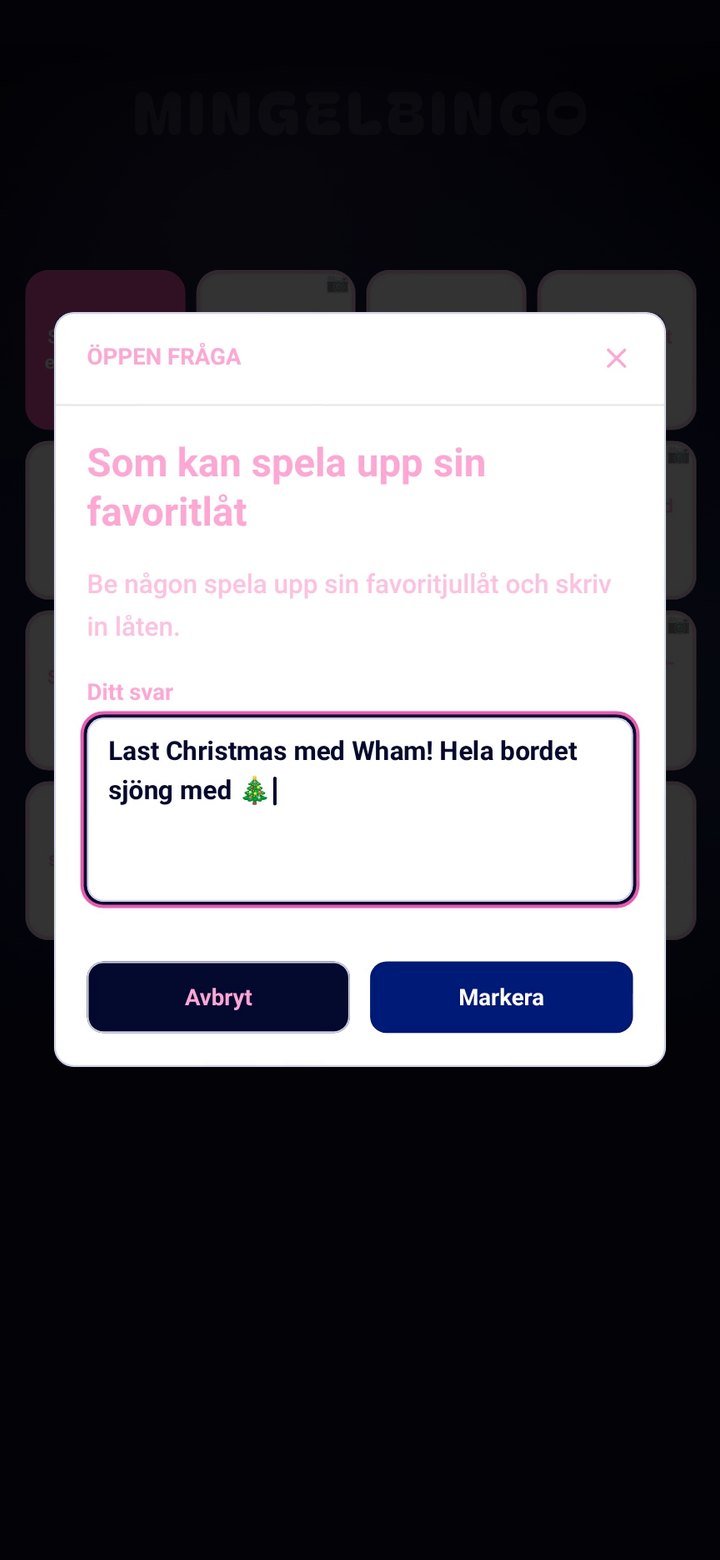
The card opens smoothly on top of the game, with the question, an optional description and an optional image.
Types their answer
The answer field holds up to 500 characters, from a single word to a couple of well-written sentences.
Sees how much space is left
A discreet counter, for example 425/500, appears only when the answer is approaching the limit.
Taps Mark
The button sits right below the answer field, is always visible above the keyboard and becomes active as soon as there is text.
Approved straight away
No answer key to check against: the answer is saved, the card closes and the square fills with the event's colour.
What makes the open question smart in MingelBingo
Room for real answers
Up to 500 characters is enough for both quick words and thought-through ideas.
Built for the phone
The phone never zooms in when the keyboard opens, and the Mark button is always visible.
No pressure
Every answer is right, so everyone dares to share, even those who are usually quiet in large groups.
Open question compared with the other text questions
| Name question | Correct answer | Open question | |
|---|---|---|---|
| Purpose | Mingling and networking | Knowledge test and quiz | Ideas, opinions and feedback |
| The answer is | A person's name | An exact word, number or term | Free text, up to 500 characters |
| Marking | All names accepted | Smart check against the answer key | All answers accepted |
| Hints | – | 1–3 after wrong answers | – |
| Afterwards | The name is saved in the contact list in the game | Shown in the statistics | The answer is saved and visible to the organiser |
How you get the answers
Each participant's answers
Click a participant in Event View and read exactly what they answered to every open question, with a time stamp.
Statistics per question
See how many answered each question, the most common answers and all unique submissions. Long answers are neatly shortened with Show all.
Export with one click
Download all answers as an Excel file.
Use the insights
Pass them on to management, the product team or HR, quote participants in the follow-up and follow up leads from trade show visitors who described their needs.
Example questions
How to set it up in admin
Choose the question type when you create a new event or edit a question.
Keep it punchy and engaging, for example “What will you take away from today's talk?”.
Optional: an extra line of context, for example “Write 1–2 sentences about your biggest insight”.
Optional: an image if the question is about a specific case, a chart or a place at the event.
Want suggestions for open questions based on your theme, for example sustainability or team building? The AI question generator will help.
Workshops, management days, conferences, kickoffs and trade shows where you want to collect feedback, ideas or needs, or reinforce a message.
Use the answers while the event is running! Show some of the best answers on the big screen at the close. It shows that you're listening.
Mix the question types
A really good card, usually 16 or 25 squares, mixes the types. This is what the mix usually looks like:
The questions that usually come up
Are there right and wrong answers to an open question?
No, every answer is accepted as soon as the player has written something and tapped Mark.
How long can participants' answers be?
Up to 500 characters. A counter appears when the answer is approaching the limit.
Where do the answers end up?
In Event View, both per participant and as statistics per question, in real time during the event.
Can we export the answers?
Yes. With one click you download all answers as an Excel file.
Can we get suggestions for open questions?
Yes. The AI question generator suggests open questions based on your event theme, and you edit them as you like.

Digital mingle bingo: the game that gets people to meet, move around and discover more.